Problem it solves
Open a shared PSD and half the text layers show the yellow missing-font warning. The
usual fix is manual: read the font name, search the web, judge an unfamiliar site,
download an archive, dig out the right file, install it — per font, per document, per
artist. On a team that trades PSDs daily (and every time someone gets a new PC), that
is a steady tax on production time. FontHelper turns the whole loop into one double-click.
How it works
Scan → diff → search chain → verify → install.
- Scan. Talks to the running Photoshop over COM and reads every open document —
including fonts buried inside smart objects, recursively (embedded and linked
PSD/PSB, plus a dependency-free scanner for
.ai/.pdf/.eps vector smart objects).
- Diff. Parses the name tables of locally installed fonts and subtracts them —
with an mtime/size cache that cuts the check from 0.23 s to 0.02 s on warm runs.
- Search chain. Each missing font walks ten free-font sources in priority order,
from license-safe foundries down to last-resort mirrors, with a web-search
button as the final human fallback.
- Verify. Downloads are opened and the font’s internal name is matched against
the request — a lookalike with the wrong name is skipped instead of installed,
and every failure surfaces its reason in the UI (login wall, empty archive, name
mismatch).
- Install. Into the user font folder with per-user registry entries — no admin
rights, safe on locked-down office machines.
License-aware by design
The result list is deliberately not one big “install all” button:
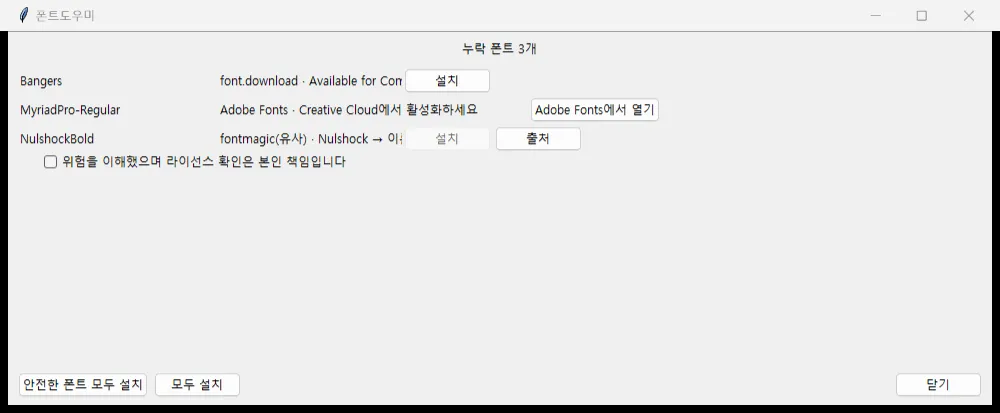
- Safe sources get a one-click install.
- Unclear-license sources require an explicit risk-acknowledgement checkbox and
link back to the origin page — the tool refuses to make that judgement for you.
- Adobe Fonts are detected but deliberately left alone — recent Photoshop
auto-installs them from Creative Cloud, so the tool only points there instead of
downloading anything.
- A separate “install all safe fonts” bulk action exists precisely so the safe
path stays one click without blurring the line.
Screenshot reproduced with a synthetic demo file — no production documents.
Engineering notes
Built test-first: 166 tests, with every site parser locked to real HTML fixtures so
the suite runs offline and a source redesign shows up as a red test instead of a
silent field failure. Ships as a single 33 MB PyInstaller exe — no Python, no
installer, SmartScreen guidance included — with a rotating log in %APPDATA% so a
coworker’s bug report can travel as one file. Photoshop connection falls back across
COM ProgID versions, so multi-version and beta installs still connect. Distribution
runs through GitHub Releases.
Why it’s here
Same pattern as the rest of this lab: find a repeating production task, build the
tool, prove it on real work, hand it to the team. FontHelper is the non-generative
end of that spectrum — spec-first design docs, AI-assisted implementation at high
velocity, and a deliverable a non-technical artist can run without reading anything
but a two-line SmartScreen note.